Sony VAIO SE Series SVSE15 new name or the old VPCSE installing drivers on Windows 7 32bit (x86) and 64bit (x64), Windows 8. Perhaps one of the most difficult to install drivers in my practice. When installing an operating tem - then the OS when the system generates an error "operating system not found" means you need to go into the BIOS by pressing F2 during startup and go to the Boot menu and select Legacy UEFI instead save and exit the BIOS

installing drivers on Windows 7 , Windows 8
To successfully install and guaranteed work Fn buttons and getting the maximum duration of the work required to comply with strict sequence of installing the drivers and utilities are already noticeable .
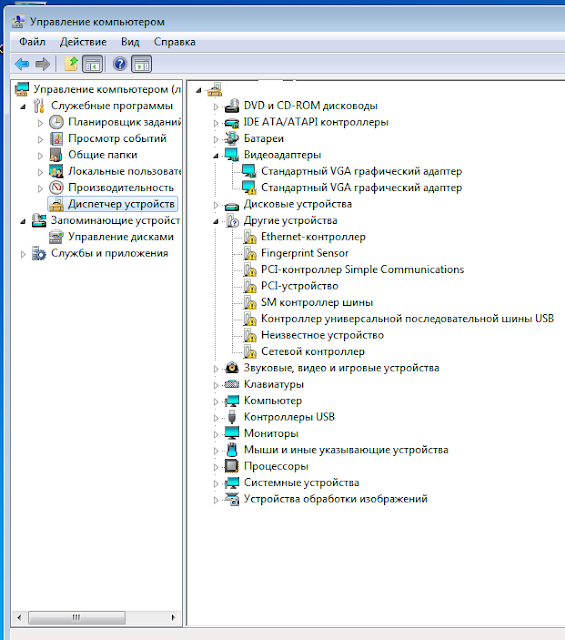
After successful installation of the OS (Windows 7 or 8) in the device manager you can see a lot of unknown devices (?) And conflict . (!) See Fig. 1 below as I have , but remember that you may be different from my picture because it is possible that you have a different configuration of the PC.
USB \ VID_08FF & PID_168F & REV_2501
Fig. 1 Unknown devices and conflicts in Device Manager.
Now, let 's understand that in order to install the drivers and which thus get rid of the conflicts in the system. I'm just warning you that your laptop can be a different picture in the control as The veil is the version of the OS.
1. Standart VGA Graphics Adapter his ID ( how do you know the device ID here ) PCI - \ VEN_8086 & DEV_0166 & SUBSYS_909C104D & REV_09 Put the Intel Graphics Driver HD4000 ( switch mode STAMINA)
2 . Standart VGA Graphics Adapter his ID PCI - \ VEN_10DE & DEV_0FD3 & SUBSYS_909C104D & REV_A1 switched to SPEED and restart the computer, install the driver NVIDIA, reboot . ( for ATI to do everything the same way)
3 . Ethernet controller its ID PCI - \ VEN_10EC & DEV_8168 & SUBSYS_909B104D & REV_07 set manually ! . Look here how to put the drivers manually.
4 . Fingerprint - USB \ VID_08FF & PID_168F & REV_2501 fingerprint reader , simply install AuthenTec Truite and restart your computer
5 . PCI controller Simple Communication PCI - \ VEN_8086 & DEV_1E3A & SUBSYS_909B104D & REV_04 just install Intel Management Engine Interface
6. Pci device PCI \ VEN_10EC & DEV_5209 & SUBSYS_909B104D & REV_01 install Realtek PCIE CR install via Setup.exe file or manually.
7. SM Bus Controller his ID PCI \ VEN_8086 & DEV_1E22 & SUBSYS_909B104D & REV_04 Intel SM Bus Controller 7Series/C216 put in hand
8. Universal Serial Bus USB PCI \ VEN_8086 & DEV_1E31 & SUBSYS_909B104D & REVNe_04 just Stavec
9. Unknown devices ID SNY5001 be set manually
10 . Sets controller PCI \ VEN_8086 & DEV_088E & SUBSYS_40608086 & REV_24 Wireless Networking + Intel ® Centrino ® Wi-Fi Products + Intel ® Centrino ® Advanced-N 6235 + Windows 7 (32 -bit) just set for Wi-FI
11. Chipset - just Stavec
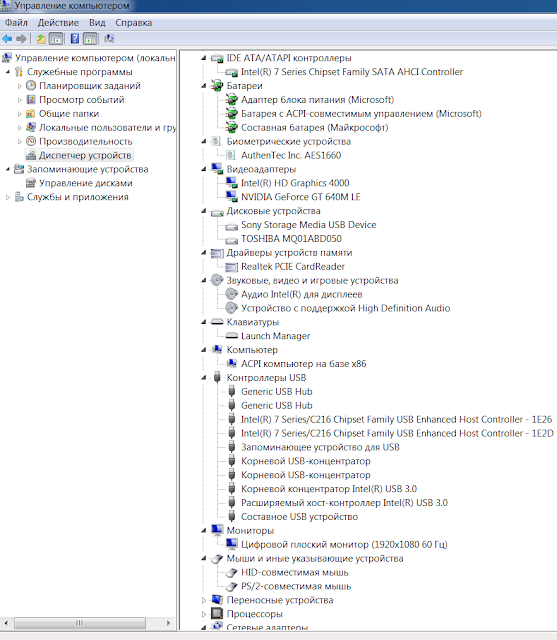
Figure 2 . You can see a screenshot of control after installing the drivers . Should be roughly the same pattern (all the veil on the PC )

SNY5001
Fig. 2 Screenshot of control after installing the drivers .
Now the fly in the ointment . On Windows 7 (32 -bit) could not set a little utility. Therefore the " hot keys + Fn" brightness , switching displays, as well as Bluetooth is not earned.
Now you can proceed to install utilities and drivers for Windows 7 and Windows 8 ( 64 -bit).
12. Realtek Audio Driver just ustnovit
13. Touchpad driver unfortunately works correctly only on 64 -bit - just set
14. Sony Shared Library utility for shortcuts , unfortunately works correctly only on 64 -bit - just install , reboot the PC
15. VAIO Location Utility utility for shortcuts , unfortunately works correctly only on 64 -bit - just install , reboot the PC
16. Sony Notebook Utilities consists of
- Battery Checker 4.6.0.05310
- VAIO Control Center 5.0.0.07070
- VAIO Power Management 5.5.0.07130
Run *. Exe file from the archive will be installed , the computer will reboot several times , you can not stop this process .
17. VAIO Smart Network - power management models due Wi-FI, Bluetooth, and if there is a 3G modem.
If you like this article has helped you can thank the author's purse WebMoney Z276373925574
If Wasp some reason it does not work or you are the unwilling to spend their time - please contact us for help . Myproizvodim complete customization , installation and solve any problems notebooks Sony VAIO.
Anofriev Gregory Dnepropetrovsk
E-mail: grisha.anofriev@gmail.com
Tags : SVS1311A4E, SVS1311B4E, SVS1311C5E, SVS1311D4E, SVS1311E3EW, SVS1311E3R, SVS1311E3RW, SVS1311E4E, SVS1311F3ES, SVS1311F3EW, SVS1311G3ES, SVS1311G4E, SVS1311H3EW, SVS1311H4E, SVS1311J3EW, SVS1311K9EB, SVS1311L9ES, SVS1311L9RB, SVS1311L9RS, SVS1311M9ES, SVS1311M9RB, SVS1311N9ES, SVS1311P9EB, SVS1311Q9EB,
SVS1311R9EB, SVS1311R9ES, SVS1311S9EB, SVS1311S9RB, SVS1312C5E, SVS1312E3RP, SVS1312E3RR, SVS1312E3RW, SVS1312G3ER, SVS1312G3EW, SVS1312H3ES, SVS1312J3EW, SVS1312K3EW, SVS1312M9RB, SVS1312N9EB, SVS1312P9EB, SVS1312Q9ES, SVS1312R9EB, SVS1312S9EB, SVS1312S9RB, SVS13A1C5E, SVS13A1S9ES, SVS13A1T9ES, SVS13A1U9ES, SVS13A1V8RB, SVS13A1V8RS, SVS13A1V9EB, SVS13A1W9ES, SVS13A1X8RB, SVS13A1X9ES, SVS13A1Y9ES, SVS13A1Z9ES, SVS13A1Z9RB, SVS13A1Z9RN, SVS13A2C5E, SVS13A2V9RS, SVS13A2W9ES, SVS13A2X9ES, SVS13A2X9RS, SVS13A2Z9ES, SVS13A2Z9RS, SVS15112C5E, SVS1511C5E, SVS1511F4R, SVS1511L3ES, SVS1511M3EW, SVS1511N3ES, SVS1511Q9EB, SVS1511R9ES, SVS1511S3RB, SVS1511S9ES, SVS1511T9EB, SVS1511T9ES, SVS1511U9ES, SVS1511V9EB, SVS1511V9ES, SVS1511V9RB, SVS1511W9EB, SVS1511X9EB, SVS1511X9RB, SVS1512S1ES, SVS1512U1RW, SVS1512V1ES, SVS1512V1RB, SVS1512V9ES, SVS1512X1RB, SVS1512X9EB, SVS1512Z1ES, SVS1512Z9EB, SVS1512Z9RB, VPCSE1A9E, VPCSE1B9E, VPCSE1C5E, VPCSE1C9E, VPCSE1D9E, VPCSE1E1E / S, VPCSE1J1E / S, VPCSE1L1E / S, VPCSE1L1E / S, VPCSE1M1E / S, VPCSE1S9E / B, VPCSE1V9E / B, VPCSE1V9R / B, VPCSE1X1R / B, VPCSE1X9E / S, VPCSE1Z9E / B, VPCSE1Z9R / B, VPCSE2C5E, VPCSE2E1E / S, VPCSE2F1E / S, VPCSE2J9E / B, VPCSE2K9E / B, VPCSE2L9E / B, VPCSE2L9E / S, VPCSE2M9E / B, VPCSE2N1E / S, VPCSE2S1E / S, VPCSE2V9E / B, VPCSE2V9E / S, VPCSE2V9R / B, VPCSE2X1R / B, VPCSE2X9E / B, VPCSE2X9E / S, VPCSE2Z9R / B,
installing drivers on Windows 7 , Windows 8
To successfully install and guaranteed work Fn buttons and getting the maximum duration of the work required to comply with strict sequence of installing the drivers and utilities are already noticeable .
Sony VAIO VPCSE или SVSE15, SE ALL DRIVERS For WINDOWS 7 WINDOWS 8:
Link 2: Download Turbobit.net
Warning if the link broken or not working , you can write to me about it and I will try to solve this problem.
Warning if the link broken or not working , you can write to me about it and I will try to solve this problem.
Support my group on Facebook.com or Twitter join us! Thank you in advance for your support and that you have chosen my blog.
After successful installation of the OS (Windows 7 or 8) in the device manager you can see a lot of unknown devices (?) And conflict . (!) See Fig. 1 below as I have , but remember that you may be different from my picture because it is possible that you have a different configuration of the PC.

USB \ VID_08FF & PID_168F & REV_2501
Fig. 1 Unknown devices and conflicts in Device Manager.
Now, let 's understand that in order to install the drivers and which thus get rid of the conflicts in the system. I'm just warning you that your laptop can be a different picture in the control as The veil is the version of the OS.
1. Standart VGA Graphics Adapter his ID ( how do you know the device ID here ) PCI - \ VEN_8086 & DEV_0166 & SUBSYS_909C104D & REV_09 Put the Intel Graphics Driver HD4000 ( switch mode STAMINA)
2 . Standart VGA Graphics Adapter his ID PCI - \ VEN_10DE & DEV_0FD3 & SUBSYS_909C104D & REV_A1 switched to SPEED and restart the computer, install the driver NVIDIA, reboot . ( for ATI to do everything the same way)
3 . Ethernet controller its ID PCI - \ VEN_10EC & DEV_8168 & SUBSYS_909B104D & REV_07 set manually ! . Look here how to put the drivers manually.
4 . Fingerprint - USB \ VID_08FF & PID_168F & REV_2501 fingerprint reader , simply install AuthenTec Truite and restart your computer
5 . PCI controller Simple Communication PCI - \ VEN_8086 & DEV_1E3A & SUBSYS_909B104D & REV_04 just install Intel Management Engine Interface
6. Pci device PCI \ VEN_10EC & DEV_5209 & SUBSYS_909B104D & REV_01 install Realtek PCIE CR install via Setup.exe file or manually.
7. SM Bus Controller his ID PCI \ VEN_8086 & DEV_1E22 & SUBSYS_909B104D & REV_04 Intel SM Bus Controller 7Series/C216 put in hand
8. Universal Serial Bus USB PCI \ VEN_8086 & DEV_1E31 & SUBSYS_909B104D & REVNe_04 just Stavec
9. Unknown devices ID SNY5001 be set manually
10 . Sets controller PCI \ VEN_8086 & DEV_088E & SUBSYS_40608086 & REV_24 Wireless Networking + Intel ® Centrino ® Wi-Fi Products + Intel ® Centrino ® Advanced-N 6235 + Windows 7 (32 -bit) just set for Wi-FI
11. Chipset - just Stavec
Figure 2 . You can see a screenshot of control after installing the drivers . Should be roughly the same pattern (all the veil on the PC )

SNY5001
Fig. 2 Screenshot of control after installing the drivers .
Now the fly in the ointment . On Windows 7 (32 -bit) could not set a little utility. Therefore the " hot keys + Fn" brightness , switching displays, as well as Bluetooth is not earned.
Now you can proceed to install utilities and drivers for Windows 7 and Windows 8 ( 64 -bit).
12. Realtek Audio Driver just ustnovit
13. Touchpad driver unfortunately works correctly only on 64 -bit - just set
14. Sony Shared Library utility for shortcuts , unfortunately works correctly only on 64 -bit - just install , reboot the PC
15. VAIO Location Utility utility for shortcuts , unfortunately works correctly only on 64 -bit - just install , reboot the PC
16. Sony Notebook Utilities consists of
- Battery Checker 4.6.0.05310
- VAIO Control Center 5.0.0.07070
- VAIO Power Management 5.5.0.07130
Run *. Exe file from the archive will be installed , the computer will reboot several times , you can not stop this process .
17. VAIO Smart Network - power management models due Wi-FI, Bluetooth, and if there is a 3G modem.
If you like this article has helped you can thank the author's purse WebMoney Z276373925574
If Wasp some reason it does not work or you are the unwilling to spend their time - please contact us for help . Myproizvodim complete customization , installation and solve any problems notebooks Sony VAIO.
Anofriev Gregory Dnepropetrovsk
E-mail: grisha.anofriev@gmail.com
Tags : SVS1311A4E, SVS1311B4E, SVS1311C5E, SVS1311D4E, SVS1311E3EW, SVS1311E3R, SVS1311E3RW, SVS1311E4E, SVS1311F3ES, SVS1311F3EW, SVS1311G3ES, SVS1311G4E, SVS1311H3EW, SVS1311H4E, SVS1311J3EW, SVS1311K9EB, SVS1311L9ES, SVS1311L9RB, SVS1311L9RS, SVS1311M9ES, SVS1311M9RB, SVS1311N9ES, SVS1311P9EB, SVS1311Q9EB,
SVS1311R9EB, SVS1311R9ES, SVS1311S9EB, SVS1311S9RB, SVS1312C5E, SVS1312E3RP, SVS1312E3RR, SVS1312E3RW, SVS1312G3ER, SVS1312G3EW, SVS1312H3ES, SVS1312J3EW, SVS1312K3EW, SVS1312M9RB, SVS1312N9EB, SVS1312P9EB, SVS1312Q9ES, SVS1312R9EB, SVS1312S9EB, SVS1312S9RB, SVS13A1C5E, SVS13A1S9ES, SVS13A1T9ES, SVS13A1U9ES, SVS13A1V8RB, SVS13A1V8RS, SVS13A1V9EB, SVS13A1W9ES, SVS13A1X8RB, SVS13A1X9ES, SVS13A1Y9ES, SVS13A1Z9ES, SVS13A1Z9RB, SVS13A1Z9RN, SVS13A2C5E, SVS13A2V9RS, SVS13A2W9ES, SVS13A2X9ES, SVS13A2X9RS, SVS13A2Z9ES, SVS13A2Z9RS, SVS15112C5E, SVS1511C5E, SVS1511F4R, SVS1511L3ES, SVS1511M3EW, SVS1511N3ES, SVS1511Q9EB, SVS1511R9ES, SVS1511S3RB, SVS1511S9ES, SVS1511T9EB, SVS1511T9ES, SVS1511U9ES, SVS1511V9EB, SVS1511V9ES, SVS1511V9RB, SVS1511W9EB, SVS1511X9EB, SVS1511X9RB, SVS1512S1ES, SVS1512U1RW, SVS1512V1ES, SVS1512V1RB, SVS1512V9ES, SVS1512X1RB, SVS1512X9EB, SVS1512Z1ES, SVS1512Z9EB, SVS1512Z9RB, VPCSE1A9E, VPCSE1B9E, VPCSE1C5E, VPCSE1C9E, VPCSE1D9E, VPCSE1E1E / S, VPCSE1J1E / S, VPCSE1L1E / S, VPCSE1L1E / S, VPCSE1M1E / S, VPCSE1S9E / B, VPCSE1V9E / B, VPCSE1V9R / B, VPCSE1X1R / B, VPCSE1X9E / S, VPCSE1Z9E / B, VPCSE1Z9R / B, VPCSE2C5E, VPCSE2E1E / S, VPCSE2F1E / S, VPCSE2J9E / B, VPCSE2K9E / B, VPCSE2L9E / B, VPCSE2L9E / S, VPCSE2M9E / B, VPCSE2N1E / S, VPCSE2S1E / S, VPCSE2V9E / B, VPCSE2V9E / S, VPCSE2V9R / B, VPCSE2X1R / B, VPCSE2X9E / B, VPCSE2X9E / S, VPCSE2Z9R / B,
Yorumlar
Yorum Gönder